
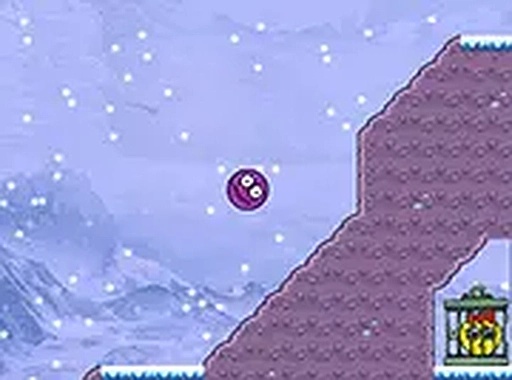
Core Objective and Controls
Maze Ball Rescue gives players a single clear goal per stage: navigate a small ball through a maze, locate a key, and use it to free a friend trapped in a cage. The game supports keyboard arrow keys on desktop and on-screen controls on touch devices, so no tutorial is needed before the first move. Each maze stands alone as a puzzle, and the real challenge comes from working out the correct sequence of moves rather than mastering complicated inputs.Obstacle Types and Timing
As players advance, mazes add moving obstacles and hazards that block the direct route. Rotating barriers, shifting walls, and pits appear in increasingly clever combinations. Pits are particularly punishing because they send the ball back to the start of the maze. Passing these hazards requires timing and patience—sometimes the best move is to wait for a barrier to rotate away before proceeding. This turns each maze into a test of observation and route planning rather than reflexes alone.Visual Clarity and Atmosphere
The game uses bright, cheerful graphics with a clean cartoon-like aesthetic. Each maze has distinct colors and patterns that make paths and obstacles easy to tell apart at a glance. That visual clarity matters because players need to read the layout quickly and track moving parts. Simple animations add a sense of movement to the ball and its surroundings without distracting from the puzzle. The overall tone is lighthearted and suitable for players of all ages.Difficulty Progression
Early mazes are open and simple, teaching the basic mechanics of movement, key collection, and cage unlocking. Later layouts grow more complex, requiring players to remember paths and anticipate obstacle patterns. The difficulty curve is gradual, so newcomers are not overwhelmed early on, while experienced players still find a comfortable challenge in the later stages. Finishing each maze provides a small sense of accomplishment that encourages moving on to the next one.Access and Platform Support
Maze Ball Rescue runs directly in a web browser with no downloads or installations. It works on desktop computers and mobile devices, adapting to touch controls on phones and tablets. A full-screen mode is available for a more focused play session. This makes the game convenient for short breaks or longer sessions, as long as an internet connection is available.Editorial Notes
Compatibility
✅ Works on PC & Mobile | Recommended: Chrome / Safari / Edge



Comments
0 comments