
Character Styling Basics
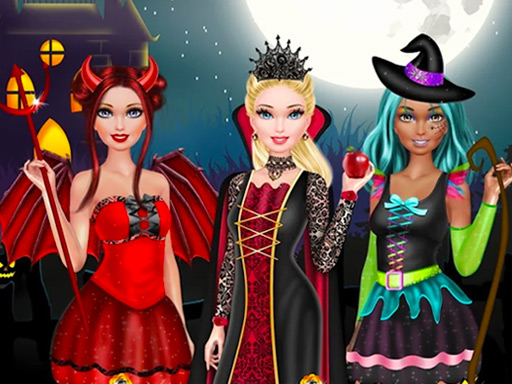
Halloween Style Studio begins with selecting a character. From there, you move into a makeup workspace where face paints, eyeshadows, and lip colors are applied using click-and-drag controls. The interface uses clear icons, so each tool is easy to identify without a tutorial. Because there is no time limit or scoring, you can adjust colors and placement until the design matches what you have in mind.
Makeup Tools and Application
The makeup section focuses on three cosmetic categories: face paints, eyeshadows, and lip colors. These are not just preset swatches; click-and-drag application means you control where color lands on the face. That small mechanical difference matters because it lets you create asymmetrical designs, blend shades, or build layered effects. The game treats makeup as a creative tool rather than a checklist, so experimentation is the intended approach.
Wardrobe and Accessory Mixing
After makeup, the wardrobe section offers costumes, hats, and accessories. Every item follows a Halloween theme, with options that lean either playful or lighthearted. Mixing and matching is the core activity here: a costume choice can change how a makeup design reads, and an accessory can tie the whole look together. Since nothing is locked behind a timer, you can swap pieces freely until the combination feels right.
Creative Freedom and Audience
The game is built for players who enjoy dress-up and style games. Its lack of competition, scoring, or time pressure makes it accessible to a wide age range, and the simple controls reduce the learning curve. The focus stays on self-expression: trying different color combinations, testing costume pairings, and seeing how small changes affect the overall result. That structure supports repeated play without demanding skill or reflexes.
Comments
0 comments